
Chronograph for your working day
Account for time.
Not every minute.
Write naturally. Timemaster reconstructs your week from meetings, huddles, tickets and commits, then gives you the ledger to review.
Inside the product
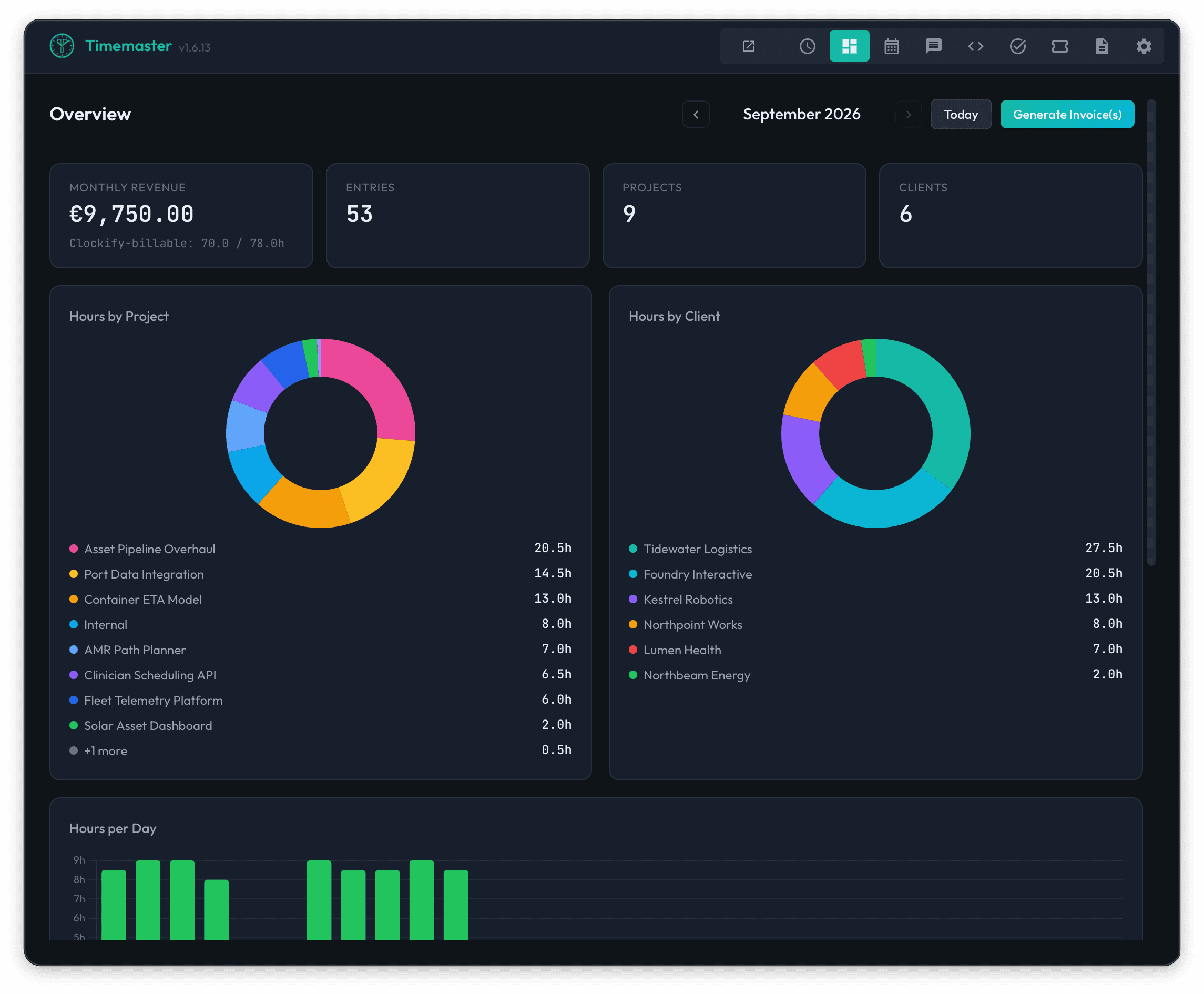
See Where Every Working Hour Goes
Connect daily activity to accurate time entries, then track team workload, billing, capacity, and delivery across the organization.
Your calendar, chat, tickets
and commits, gathered
Timemaster connects to the tools you already use. Your meetings, huddles, commits, and tickets flow into a single view — no copy-pasting, no context switching.
Jira
Pull your assigned tickets directly into Timemaster. The AI uses Jira context to match tasks to the right projects — even resolving EPIC hierarchies automatically.
- Browse assigned tickets
- EPIC-based project matching
- Ticket context for AI analysis
- One-click insert into notes
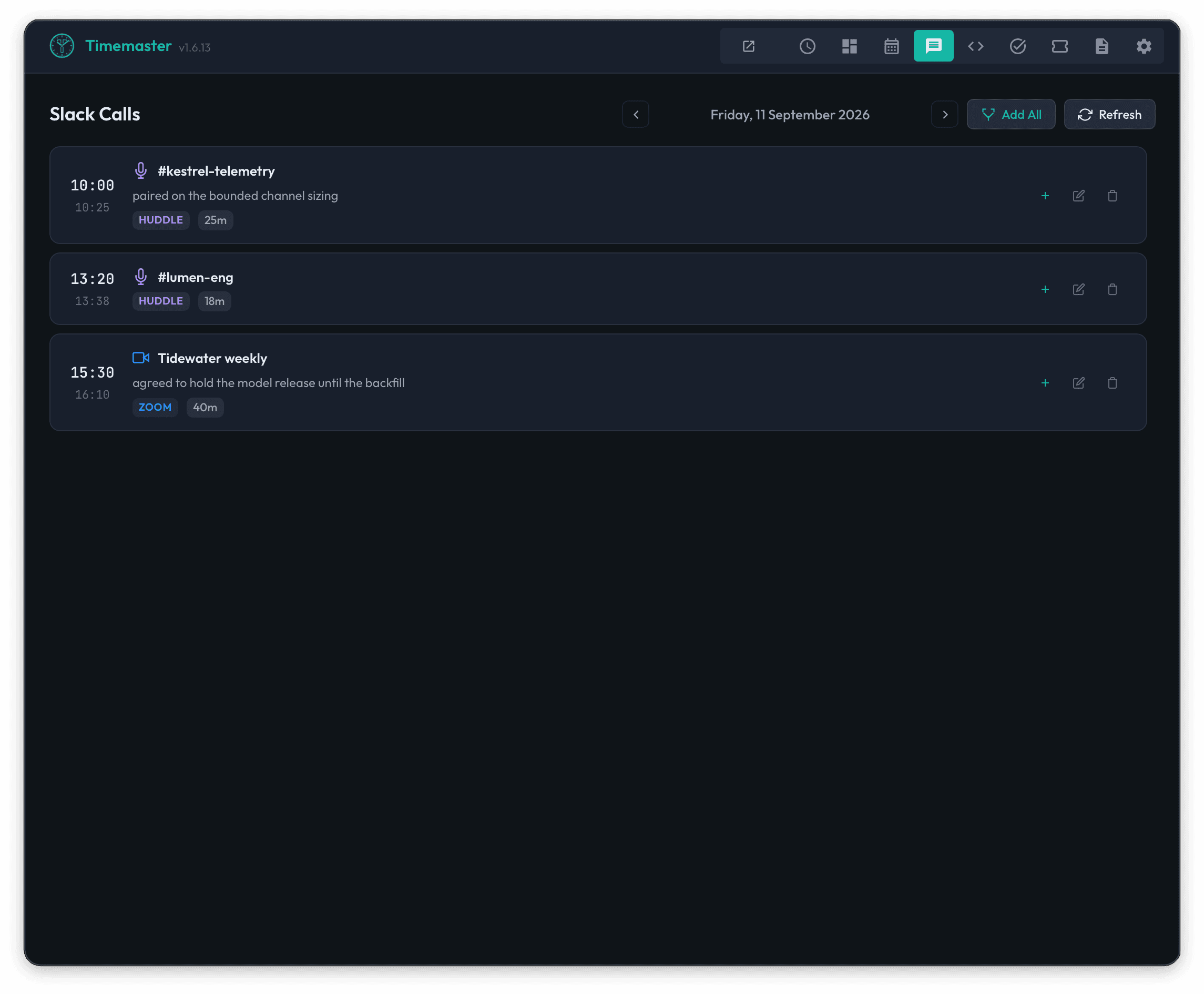
Slack
Slack huddles and Zoom calls are tracked as they happen, with participants, duration and channel recorded for you.
- Real-time huddle detection
- Zoom call tracking
- Participant names & duration
- Bulk insert all sessions
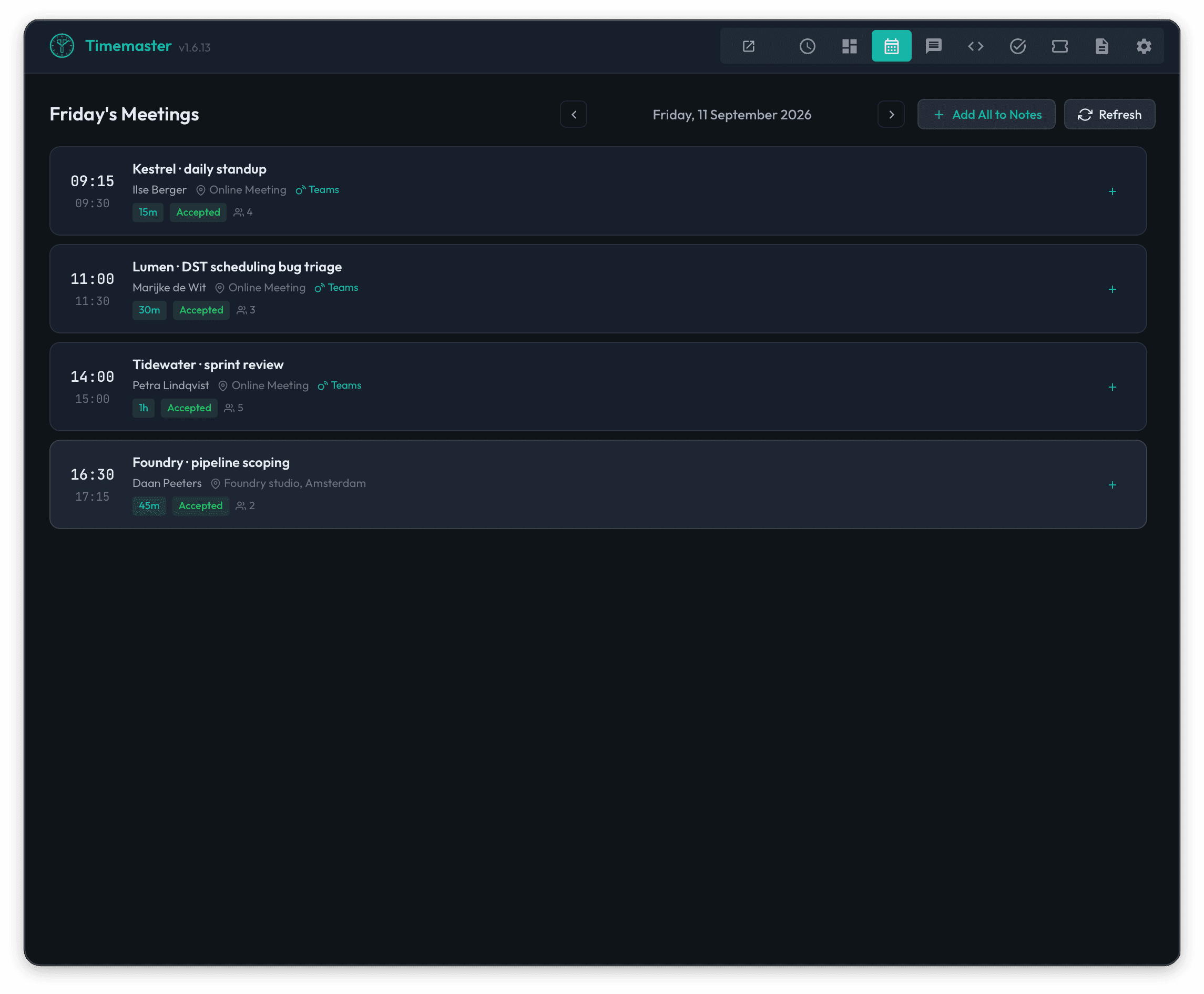
Outlook Calendar
Import the day's meetings from Microsoft Outlook over OAuth. Pick the ones that count as billable and they land in the timesheet.
- Microsoft Graph API
- One-click meeting import
- Duration auto-rounding
- Attendees & location details
Git
Scan multiple local repositories for your commits. Timemaster uses your Git config to find commits by you, across all your projects, ready to add to your notes.
- Multi-repo scanning
- Auto-detect by git email
- Commit history per day
- One-click or bulk insert
Clockify
Push reviewed entries to Clockify. Projects and tasks are matched automatically and kept in sync on a schedule.
- One-click submission
- Automatic project sync
- EPIC-based matching
- Failed submission recovery
Your week, reconstructed
from what you already did
Meetings, huddles, commits and tickets become time entries; you write the rest in plain language.
Natural Language Input
Write your time entries like you'd tell a colleague. No forms, no dropdowns — just plain text. Add time hints or let the AI figure it out.
AI-Powered Analysis
AI estimates durations, matches tasks to projects, and resolves Jira EPIC hierarchies without you filling in a single field.
Jira Tickets
Browse your assigned Jira tickets across multiple instances. Insert tickets into notes and let the AI match them to the right projects.
Slack Huddle Tracking
Automatically detect and track Slack huddles and Zoom calls in real-time. See who you talked to, for how long, and in which channel.
Outlook Calendar
Import meetings from Microsoft Outlook with OAuth sign-in. Attendees, duration and location come across; drop the ones you did not attend.
Git Commit Scanning
Scan multiple local repositories for your commits. Your git config email is used to find your commits across all your projects.
Local AI Models
Run AI locally with the bundled Ollama runtime. Pick a recommended model or point it at one you already have.
Custom Rules
Define pattern-based rules for recurring entries. "tech thursday" always maps to the right project with the right hours.
Preview & Edit
Review every AI suggestion before submitting. Hours, customers, projects, tasks and descriptions are all editable inline.
TODO Lists
Manage grouped task lists right inside Timemaster. Create, complete, and insert TODOs directly into your notes.
Keyboard Shortcuts
Global hotkeys let you show the app, preview entries, and submit — all without reaching for the mouse. Configurable to your preference.
One-Click Submission
Send the reviewed entries to your time tracking backend in one action. Failed submissions are kept and can be retried.
Your choice of
AI intelligence
Four ways to run the analysis: a Claude Teams plan billed to your org, multi-vendor cloud through OpenRouter, or local inference where the prompt goes to localhost instead of a provider.
25+ Cloud Models
Access AI models from Google, OpenAI, Anthropic, Meta, Mistral, DeepSeek, and xAI through OpenRouter, including new releases as they land.
- Google Gemini, GPT-4o, Claude, Llama
- DeepSeek, Grok, Mistral, and more
- Automatic context limit detection
- Pay-per-use via OpenRouter
Bring your Claude Teams plan
Paste an Anthropic Console API key and have Timemaster bill its AI calls against your org’s Claude Teams subscription. No OpenRouter middleman, no double-billing.
- Native Anthropic Messages API
- Claude Opus 4.7, Sonnet 4.6, Haiku 4.5
- Org admin mints keys at console.anthropic.com
- One-click "Test Connection" in Preferences
Built-in Local AI
Timemaster ships with a managed Ollama runtime and downloads the recommended models for you. Prompts go to localhost, not to a cloud API.
- One-click model download
- Recommended: Qwen 2.5, Llama 3.2
- Auto-start and health monitoring
- No API keys to paste
Bring Your Own Server
Connect to any OpenAI-compatible server — Ollama, llama.cpp, vLLM, LM Studio, or LocalAI running elsewhere on your network.
- Any OpenAI-compatible API
- Custom endpoint URL
- Full model flexibility
- Run on your own hardware
How it works
From your tools to structured time entries in three steps
Gather your context
Pull in Outlook meetings, Slack huddles, Git commits and Jira tickets, then add your own notes in plain language.
## MON 2025-12-23

0.5h sprint planning with backend team       ← Calendar
0.5h huddle with Alice, Bob — design review   ← Slack
4h ECOMDEV-123 implementing auth feature      ← Jira
refactor: migrate to new API client           ← Git
1.5h code review and documentation updatesAI analyzes & organizes
The AI understands your notes, matches Jira tickets to projects via EPIC hierarchies, estimates durations, applies custom rules, and structures everything into time entries.
Review & submit
Preview the entries, fix anything that looks wrong inline, then submit. Failed submissions are kept and can be retried.
Turn rough notes into a clean timesheet
Choose a fictional workday, review what Timemaster extracts, then correct it before anything syncs.
09:00 sprint planning
09:30 ECOM-142 checkout implementation
13:30 review checkout pull request
15:00 write integration tests
Full team time tracking
as a service
Beyond the desktop app, Timemaster offers a complete self-hosted time tracking platform for teams. Projects, time, invoices, leave requests and capacity planning, on infrastructure you run yourself.
Time Tracking
Timer-based and manual time entries with rich filtering, bulk approval, and billable/non-billable tracking.
Project Management
Clients, projects, and tasks with budgets, hourly rates, color coding, and member assignment.
Invoicing
Generate invoices from billable time entries, export PDFs, and send via email. Track payment status.
Team Management
Role-based access (admin, manager, member), team dashboards, and approval workflows.
Leave Management
Vacation, sick, personal, and overtime compensation requests with approval workflows and balance tracking.
Reporting & Analytics
Summary, detailed, and weekly reports. Dashboard with project breakdowns, overtime analytics, and CSV export.
AI assistant access (MCP)
Drive the entire tracker — timers, projects, invoices, capacity, leave, reports — from Claude Code, Cursor, Claude Desktop, or Claude.ai over the open Model Context Protocol.
Run your tracker
from any AI assistant
Connect Claude Code, Cursor, Claude Desktop, or Claude.ai directly to your Timemaster workspace. 50+ tools cover the full team workflow — time entries, projects, customers, invoicing, scheduling, leave, and reporting — over the open Model Context Protocol standard.
Time entries & timers
Start, stop, and edit timers. List, approve, and bulk-approve time entries. Filter by user, project, client, task, multi-tag (ANY-of), date range, billable, or approval state.
timer_starttimer_stoptime_entries_listtime_entries_bulk_approve
Projects & customers
Create, edit, archive, and search projects and customers. Filter by client, name, or archived state. Manage project members, hourly rates, and billable defaults.
projects_listprojects_createclients_listclients_update
Invoicing — including PDFs
Preview line items before committing. Create, send, mark paid, and download invoices as PDFs returned inline as MCP embedded resources. A settings-check tool surfaces missing issuer fields before you commit.
invoices_previewinvoices_createinvoices_download_pdfinvoices_settings_check
Capacity & scheduling
Assign people to projects across date ranges, edit allocations, and pull a capacity report comparing assigned vs available hours for the whole team.
assignments_createassignments_updatecapacity_get
Time off & overtime
Submit, update, approve, or reject leave requests. Check remaining vacation and overtime balances and the count of pending requests waiting for review.
time_off_createtime_off_approvetime_off_balancetime_off_pending_count
Reports & CSV export
Summary, detailed, and weekly reports with shared filters (date range, user, project, client). Export the underlying time entries as CSV directly in the assistant.
report_summaryreport_detailedreport_weeklyreport_export_csv
Things you can ask your assistant
Every example below maps to one or two MCP tool calls. Destructive actions (invoicing, deletes, user changes) are tagged so the host prompts you to confirm before they run.
- "Approve John's entries from May 1–15."
- "Preview an invoice for ACME for last month, then create it if it looks right."
- "Who has under 20 hours allocated next week?"
- "Download the PDF for invoice #2026-014 and email it to me."
- "Submit a vacation request for July 8–12 and tell me my remaining balance."
- "Export last quarter's billable hours on the Phoenix project as CSV."
Security & isolation
The same multi-tenant guards that protect the REST API protect every MCP call.
Download the Timemaster Whitepaper
How AI-powered natural language time tracking integrates with Jira, Slack, Outlook, Git, and Clockify.
Pick how you pay
Choose monthly, yearly, or lifetime access to the direct-download edition. A website purchase does not include the separate Mac App Store purchase.
Full access to all integrations, cancel anytime.
- AI-powered time analysis
- Jira, Slack, Outlook, Git, Clockify
- Local & cloud AI models
- All future updates
Billed as €48/year — save 20%.
- Everything in Monthly
- 2 months free
- Priority support
- All future updates
One-time direct-download licence
- All future direct-download versions and updates
- No recurring fees
- All integrations included
- Local & cloud AI models
Every plan starts with a 14-day trial. Prices in EUR. Subscriptions can be cancelled at any time.
Stay up to date with Timemaster
Release notes, technical deep-dives and product updates. No spam, and you can unsubscribe at any time.
Friday, 5pm, timesheet already done
Your meetings, huddles and commits are already in Timemaster by the time you would normally start reconstructing the week.