A Solution Whitepaper by Amsterdam Technologies B.V.
Timemaster: AI-Powered Natural Language Time Tracking with Automatic Clockify Synchronization
Time tracking remains one of the most universally disliked administrative tasks in knowledge work. Studies consistently show that professionals spend 15–20…
The Problem
Time tracking remains one of the most universally disliked administrative tasks in knowledge work. Studies consistently show that professionals spend 15–20 minutes per day on timesheet management, yet the resulting data is often inaccurate, incomplete, or submitted days after the fact. For organizations that bill by the hour — consultancies, agencies, software firms — this inaccuracy translates directly to lost revenue. For companies that track time for project accounting or capacity planning, it means decisions based on unreliable data.
The core problem is not a lack of tools. The average knowledge worker already touches five or more platforms during a workday: a project tracker like Jira, a communication tool like Slack, a calendar in Outlook, a version control system like Git, and a time tracking system like Clockify. Each of these platforms contains fragments of the answer to "what did I work on today?" — yet none of them talk to each other in the context of time entry. The burden of synthesis falls entirely on the individual.
Existing time tracking solutions exacerbate the problem through their input model. Most require users to navigate dropdown menus to select clients, projects, and tasks, then manually enter durations and descriptions. This friction creates a predictable outcome: people batch their time entries at the end of the week (or month), reconstructing their days from memory. The data quality degrades with every hour of delay.
Some tools attempt automatic tracking by monitoring application usage or browser activity, but these approaches raise significant privacy concerns and often produce noisy data that requires more cleanup effort than manual entry. Others offer timer-based tracking, which demands that users remember to start and stop timers — a workflow that breaks down for anyone who context-switches frequently.
The fundamental gap is this: no tool has combined the intelligence to understand free-form human descriptions of work, the integrations to gather context from where work actually happens, and the workflow design to make the entire process feel like writing a quick note rather than filling out a bureaucratic form.
Recent advances in large language models have made it feasible to bridge this gap — to accept unstructured natural language input, enrich it with data from connected systems, and produce structured, submission-ready time entries. This is the approach Timemaster takes.
Solution Overview
Timemaster is a desktop application that transforms the time tracking workflow from form-filling into note-taking. Users write what they did in plain language — one task per line, with optional time hints — and an AI engine analyzes those notes into structured time entries complete with client, project, task, and duration assignments. The entries are then submitted directly to Clockify with a single action.
The core insight behind Timemaster is that time tracking accuracy improves dramatically when the input method matches how people naturally think about their work. People do not think in terms of "Client: Acme Corp, Project: Website Redesign, Task: Frontend Development, Duration: 2.5 hours." They think "spent the morning on the Acme website frontend." Timemaster accepts the latter and produces the former.
To make this analysis accurate, Timemaster does not rely solely on the AI interpreting text in isolation. It integrates directly with the tools where work context originates:
- Jira provides ticket assignments, statuses, and EPIC hierarchies — enabling the AI to map a mention of "ECOMDEV-123" to the correct client and project.
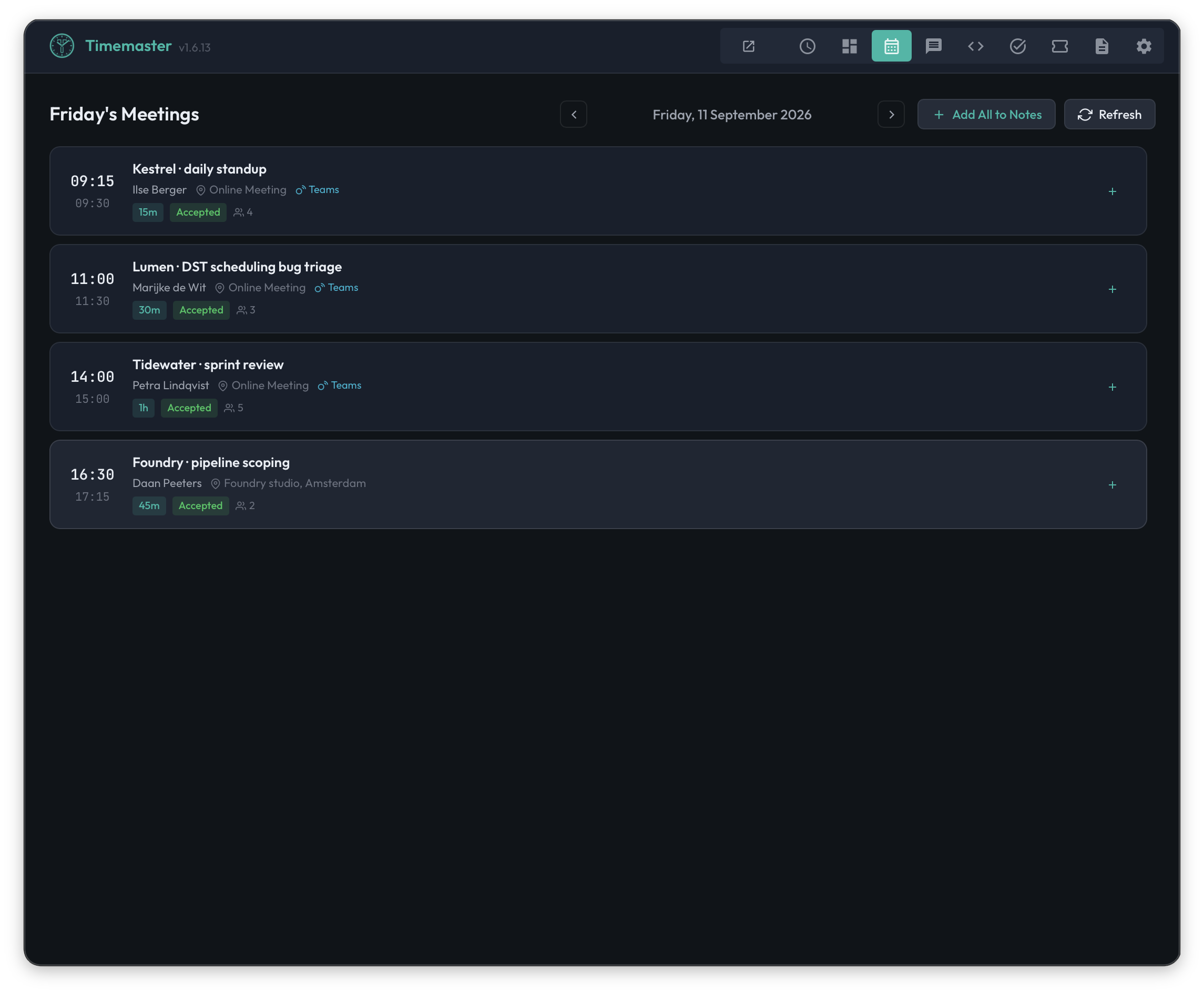
- Outlook Calendar provides meeting data — attendees, durations, and subjects — that can be inserted into notes with a single click.
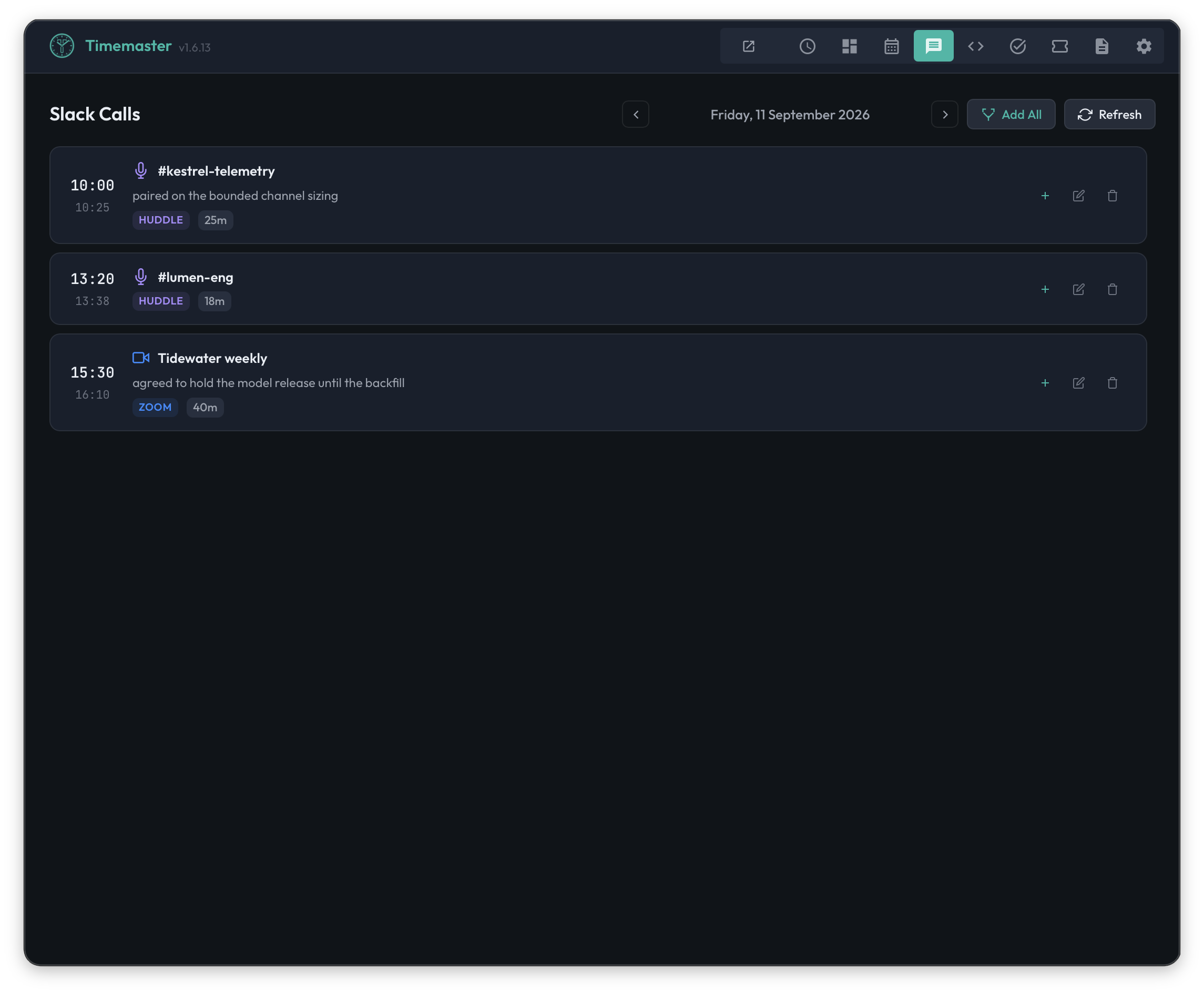
- Slack provides real-time huddle and call tracking — automatically logged with participants, channels, and durations.
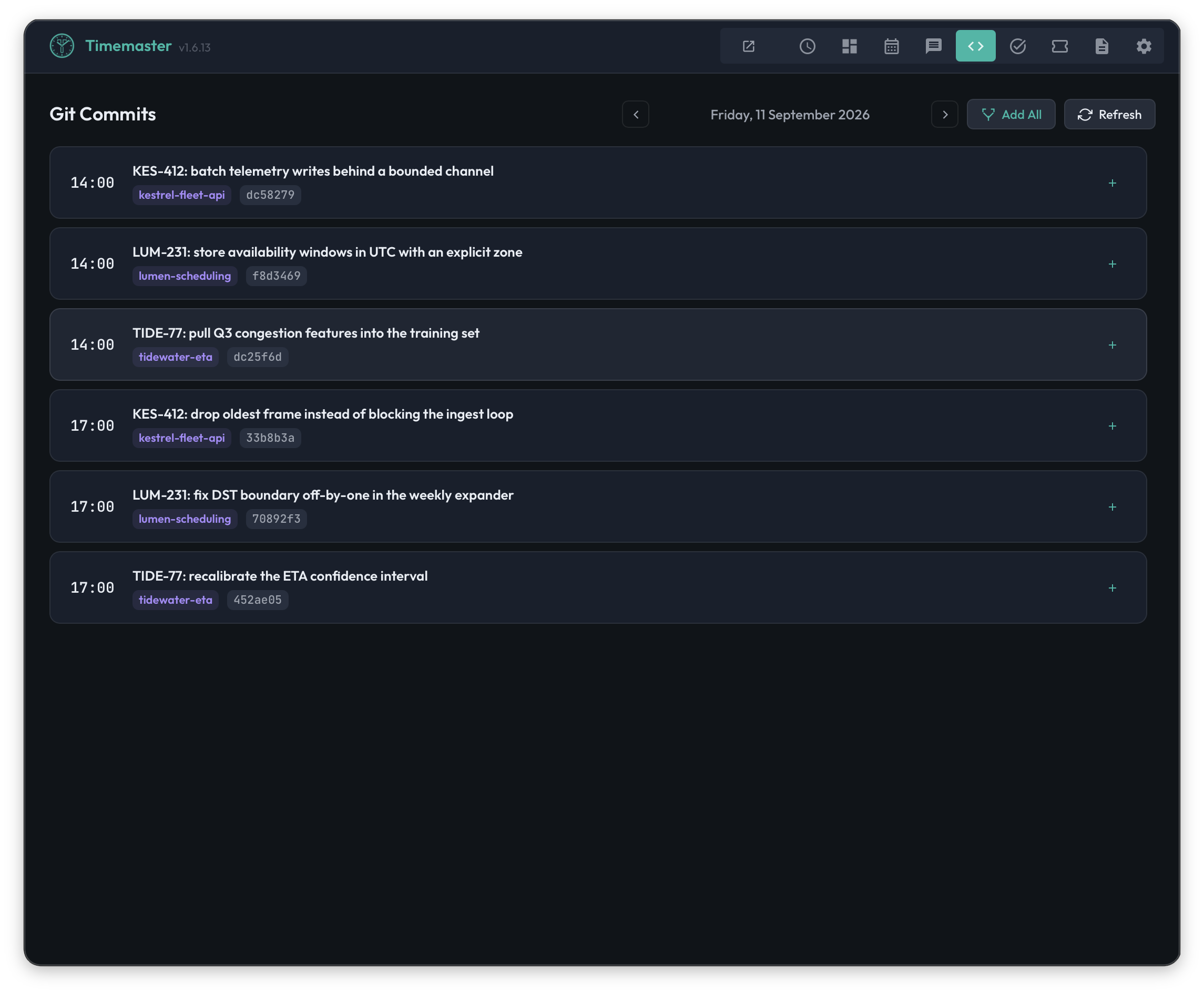
- Git provides commit history across multiple repositories — surfacing the actual code changes made throughout the day.
All of this context flows into a unified interface: a lightweight system tray application that stays out of the way until needed. There are no windows competing for screen space, no timers to manage, no forms to fill. The workflow is: open the tray app, review the context gathered from integrations, write or augment notes, let the AI analyze, review the output, and submit.
Timemaster is a production application, commercially available with full macOS support and cross-platform compatibility for Windows and Linux. It is built with a Go backend and a lightweight HTML/JavaScript frontend using the Wails framework, with AI orchestration powered by Firebase Genkit.
Key Capabilities
Natural Language Time Entry with AI Analysis
The central capability of Timemaster is its ability to accept unstructured text input and produce structured time entries. Users write one task per line in a free-form text area, optionally including time hints like 2h, 30m, or 0.5h. Lines without explicit time hints are analyzed by the AI, which estimates durations based on the task description and the overall context of the day.
The AI engine is built on Firebase Genkit's tool-calling framework. Rather than asking the LLM to produce free-text JSON (a notoriously fragile approach that frequently results in malformed output), Timemaster defines a typed schema and forces the model to return data through structured tool calls. This means the output is always well-formed: each entry contains a customer, project, task, hours, and description, mapped against the user's actual Clockify workspace structure.
The analysis is context-aware. Before the AI processes the notes, Timemaster constructs a prompt that includes:
- The full list of enabled projects and tasks from the user's Clockify workspace
- Active Jira tickets assigned to the user (with ticket keys, summaries, and EPIC associations)
- Any custom rules the user has defined for recurring entries
- A configurable system prompt that allows per-user customization
This context injection means the AI does not guess blindly. When a user writes "ECOMDEV-123 implementing auth feature," the AI can look up the ticket, find its parent EPIC, and map the entry to the correct Clockify project — all without the user specifying the project name.
Timemaster supports over 25 cloud models through OpenRouter, including Google Gemini, OpenAI GPT-4o, Anthropic Claude, Meta Llama, DeepSeek, Mistral, and xAI Grok. For organizations with data sensitivity requirements, it also supports fully local inference through a bundled Ollama runtime (with one-click model download), a self-managed Ollama instance, or any OpenAI-compatible server such as llama.cpp, vLLM, LM Studio, or LocalAI. Recommended local models for reliable tool-calling include Llama 3.3 (70B), Qwen 2.5 (32B), Mistral, and Command-R (35B).
A debug mode allows users to inspect the exact prompt sent to the model, the token count relative to the model's context limit, and the raw AI response — providing full transparency into the analysis process. The system includes automatic retry logic (up to 20 attempts) for handling empty or malformed responses from the LLM.
Clockify Integration and Submission
Timemaster's primary time tracking backend is Clockify. Once the AI has analyzed notes into structured entries, the user reviews them inline — editing customer, project, task, hours, description, and date as needed — and submits with a single click.
Behind the scenes, Timemaster maintains a synchronized copy of the user's Clockify workspace structure. Projects and tasks are discovered automatically, with scheduled background sync at configurable times (for example, 09:00 and 18:00) and manual sync on demand. The project browser provides a searchable, hierarchical view grouped by customer, with per-task toggles that control which tasks are exposed to the AI during analysis. This "smart context reduction" keeps prompts lean and accurate by excluding irrelevant projects.
Submission to Clockify includes configurable delays between API calls to respect rate limits. If a submission fails partway through (due to network issues or API errors), the pending entries are persisted locally and can be resumed on the next app launch — ensuring no work is lost.
A distinctive feature is EPIC-based project matching. When the AI encounters a Jira ticket key in a time entry description, Timemaster looks up the ticket's parent EPIC in Jira and maps it to the corresponding Clockify project. This eliminates the manual step of remembering which Clockify project corresponds to which Jira EPIC — a mapping that is often non-obvious in organizations with dozens of active projects.
Jira Integration
Timemaster supports connections to multiple Jira instances simultaneously, covering both Jira Server/Data Center (via personal access tokens) and Jira Cloud (via email and API key authentication). This is significant for consultants and contractors who work across multiple client environments.
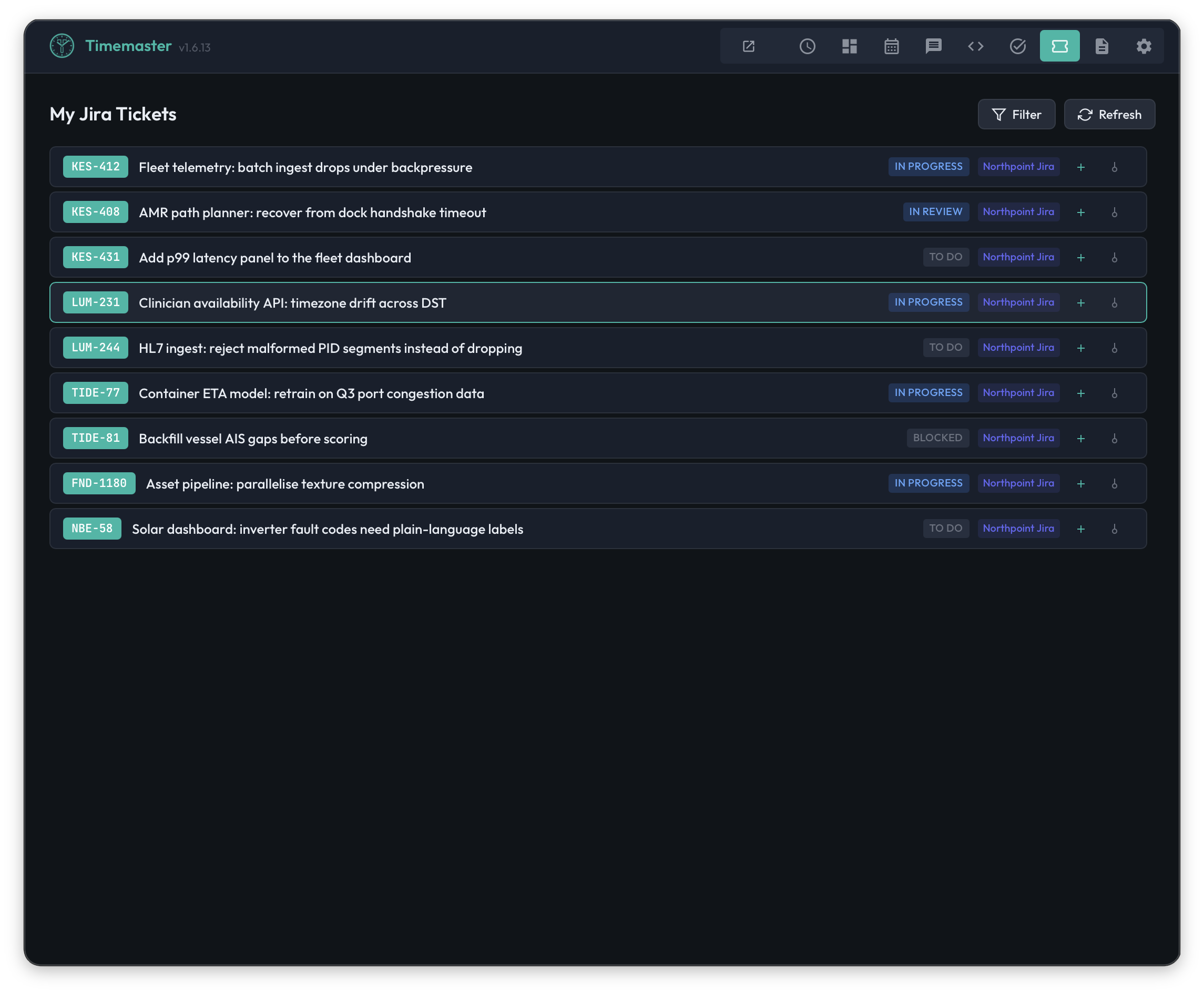
A dedicated Tickets tab displays all issues assigned to the user across all configured instances, with filterable statuses (hiding Done, Closed, or other terminal states). Tickets can be inserted into notes with a single click, pre-formatted as time entry lines. The ticket key is automatically prefixed to generated time entries (e.g., ECOMDEV-123: implementing feature), maintaining traceability between time records and issue tracker data.
The Jira integration goes beyond display. Ticket context — including keys, summaries, statuses, and EPIC hierarchies — is injected into the AI prompt, enabling the model to perform intelligent project matching. The ticket data is cached for 5 minutes with manual cache clearing available, balancing responsiveness with API efficiency. Each Jira instance can be independently tested for connectivity from the preferences panel.
Outlook Calendar Integration
Timemaster connects to Microsoft Outlook calendars through the Microsoft Graph API using OAuth 2.0 authentication. A custom URL scheme callback (timemaster://auth) handles the OAuth redirect, allowing users to sign in through a browser and return seamlessly to the app.
A dedicated Calendar tab shows today's meetings with full detail: subject, organizer, attendees, location, online meeting URL, and response status. Date navigation allows browsing past and future events. Meeting durations are automatically rounded to the nearest 0.25 hours for time entry precision.
Individual meetings or bulk selections can be inserted into notes with a single click, pre-formatted with duration and subject (e.g., 0.5h Sprint Planning). OAuth tokens are persisted locally with automatic refresh, so users sign in once and stay connected.
This integration is fully functional on macOS; on Linux and Windows, the OAuth URL scheme is not yet registered, so calendar integration is unavailable on those platforms.
Slack Huddle and Call Tracking
Timemaster tracks Slack huddles and Zoom calls in real time using Slack's Socket Mode WebSocket API. When the app detects a huddle start or a Zoom call initiated from Slack, it records the session — including participants, channel, start time, and duration — in a local SQLite database.
A dedicated Slack tab shows today's huddles and calls, with participant names (resolved via the Slack API), channel names, and durations. Historical sessions are browsable via date navigation. Sessions can be edited (adding notes), deleted (for accidental joins), or inserted into time entry notes with a single click. Sessions shorter than 60 seconds are automatically cleaned up to avoid noise.
The tracker auto-connects on app launch when Slack tokens are configured and maintains the WebSocket connection in the background for continuous monitoring.
Git Commit Integration
Timemaster scans local Git repositories for commits authored by the current user, identified by the repository's configured user.email. Users configure a list of repository paths, and the app scans them to surface commits in a dedicated Git tab.
Commits are displayed by day with date navigation support, sorted by timestamp. Each commit shows the repository name and commit message. Individual commits or bulk selections can be inserted into notes, formatted as reponame: commit message. This provides a factual record of code changes that augments the user's recollection of their day's work.
Custom Rules Engine
For recurring time entries that always map to the same project and duration, Timemaster provides a pattern-based rules system. Each rule defines a text pattern, fixed hours, and a target customer/project/task. When the AI encounters a matching pattern during analysis, it applies the rule automatically.
For example, a rule might specify that any mention of "tech thursday" maps to 0.5 hours under the Internal/Meetings project. This eliminates repetitive corrections for entries that follow the same pattern every week or sprint.
Draft System and Crash Recovery
Time entry notes are saved as per-date drafts with a 500-millisecond debounce. Drafts are persisted in dual storage: both in the browser's localStorage (for immediate crash recovery) and in the Go backend's persistent storage. On launch, Timemaster compares both sources and restores whichever is longer, providing robust recovery from unexpected termination.
Users can navigate between dates using a date picker, with each date maintaining its own independent draft. This supports the common workflow of needing to log time for a previous day while keeping today's notes in progress.
TODO Lists
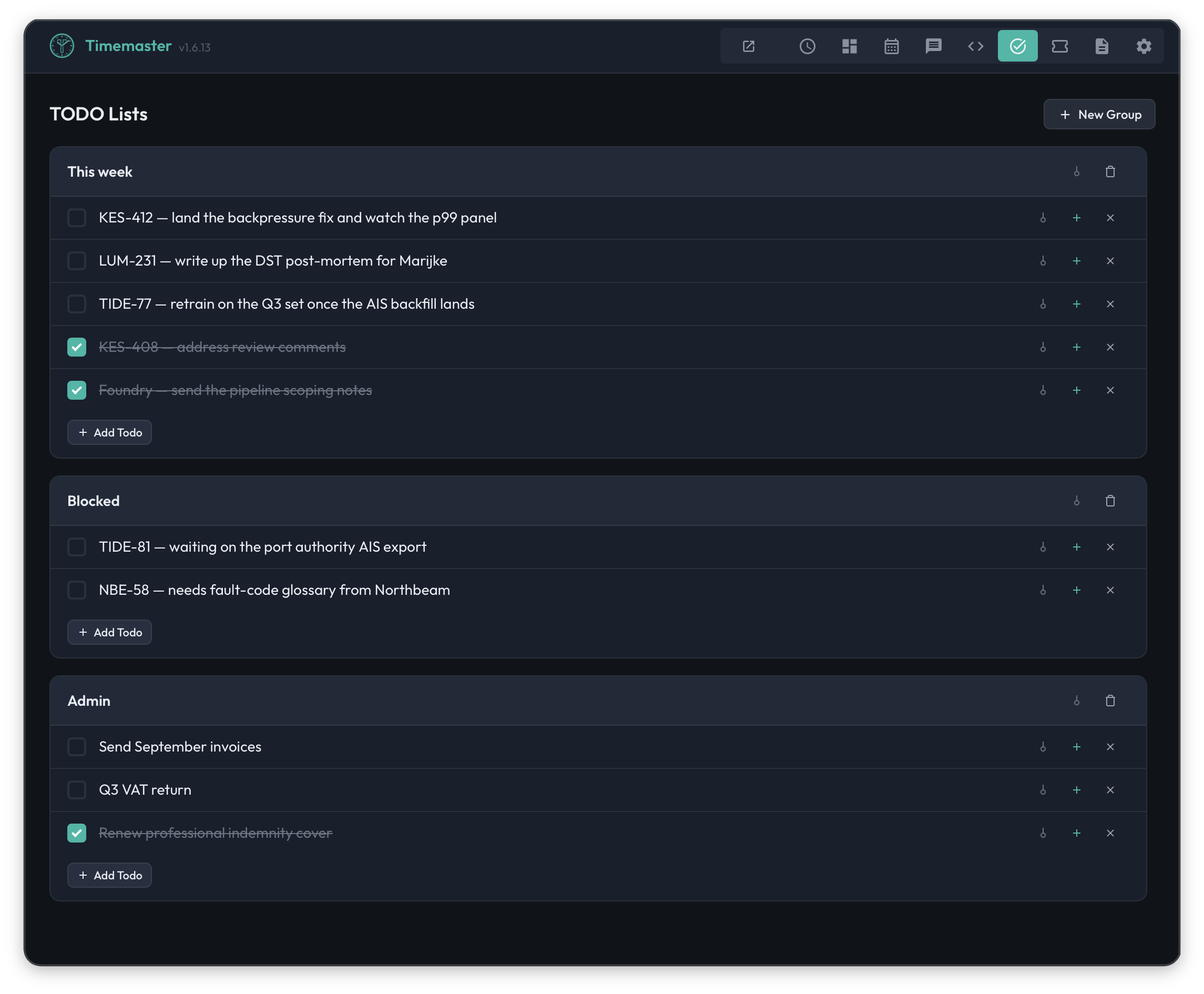
Timemaster includes grouped TODO lists that persist across sessions. Users can create named groups, add items, mark them complete, and delete them. TODO items can be inserted into time entry notes with a single click, bridging task management and time tracking.
Licensing and Auto-Update
Timemaster offers a 14-day free trial that activates automatically on first launch. License keys are validated using Ed25519 JWT signatures and bound to the machine's identity, with tokens stored securely in the operating system's keyring (macOS Keychain, Windows Credential Manager, or Linux Secret Service).
On macOS, the app includes a self-update system that checks for new versions every 6 hours. Updates are downloaded as DMG files, verified with SHA-256 checksums, and applied atomically — swapping the application bundle and relaunching without manual intervention. The application is code-signed with a Developer ID certificate and notarized with Apple.
System Tray Interface and Keyboard Shortcuts
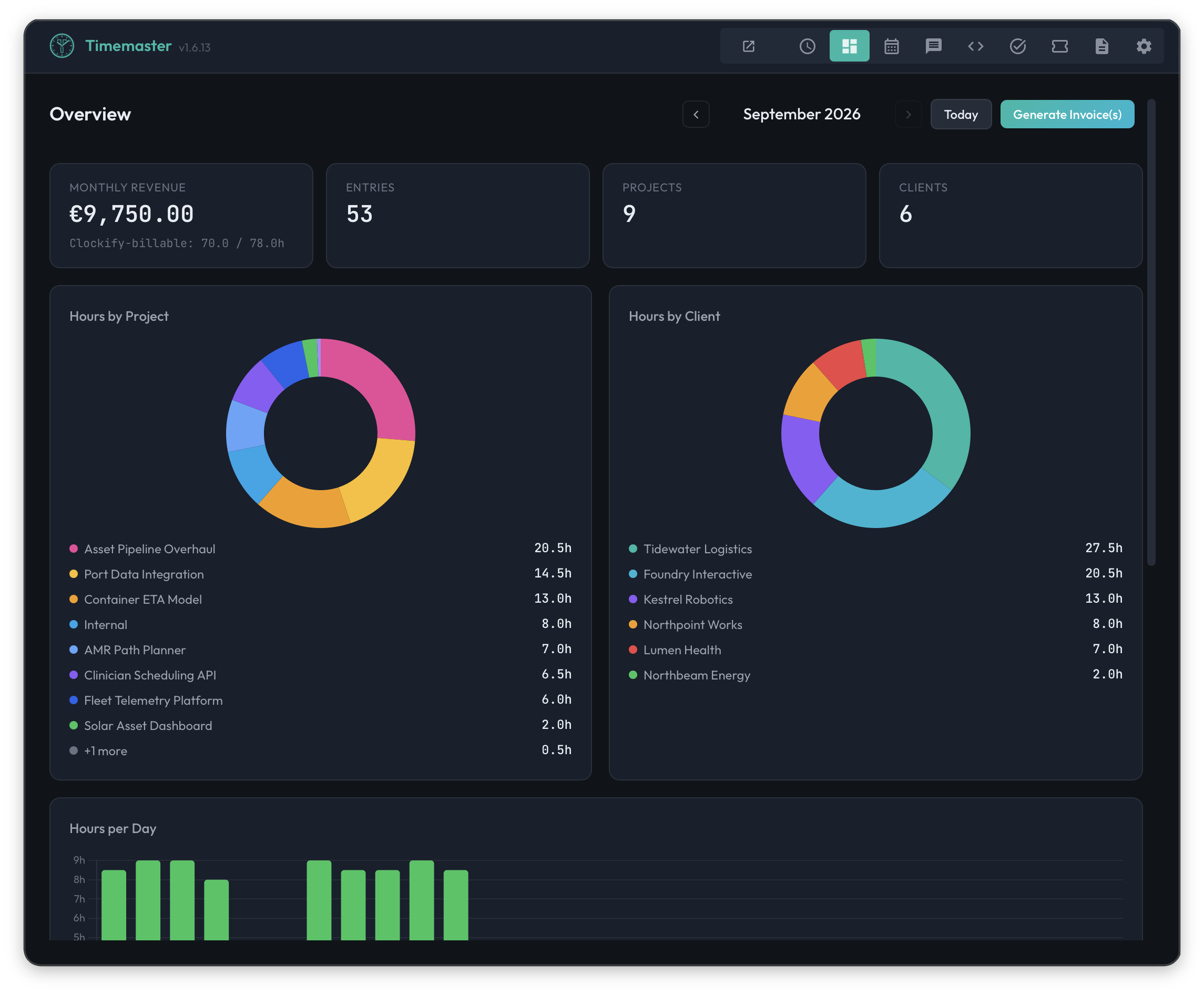
Timemaster runs as a system tray (menu bar) application, with no Dock icon on macOS. The window attaches directly below the tray icon, providing instant access without consuming screen real estate. The interface uses a dark theme with teal accents and glass-morphism styling, including support for macOS Liquid Glass translucency on macOS Tahoe.
The app offers seven tabs — Time Entries, Calendar, Slack, Git, TODOs, Tickets, and Preferences — with conditional visibility based on which integrations are configured. Global keyboard shortcuts (configurable, default Shift+Cmd+L on macOS) allow users to show the app, preview entries, and submit without reaching for the mouse.
Architecture & Technical Design
Technology Stack and Design Philosophy
Timemaster is built with a Go backend and a vanilla HTML/CSS/JavaScript frontend, orchestrated by the Wails v3 framework. This architecture was chosen to optimize for three properties: low resource consumption (no Electron runtime overhead), native platform integration (system tray, global hotkeys, keychain access), and deployment simplicity (single binary, no runtime dependencies beyond the OS).
The Go backend consists of nine services, each registered with Wails and exposed to the frontend via auto-generated JavaScript bindings. This clean service boundary means the frontend communicates with the backend through typed function calls rather than ad-hoc REST endpoints — reducing the surface area for integration bugs.
AI Orchestration
AI analysis is orchestrated through Firebase Genkit, using a compatibility layer for OpenAI-compatible APIs. This allows Timemaster to target both cloud providers (via OpenRouter) and local inference servers (via Ollama or any OpenAI-compatible endpoint) through a single code path.
The critical design decision is the use of Genkit's tool-calling mechanism rather than free-text JSON generation. The LLM is given a typed schema and must return structured data through function calls. This eliminates the class of failures where a model produces syntactically invalid JSON, omits required fields, or invents field names — problems that plague naive LLM-to-JSON approaches. The system includes up to 20 automatic retries as an additional reliability layer.
Context reduction is another important optimization. Only enabled projects and tasks are included in the AI prompt, keeping the token count within model context limits. The app displays the estimated token count alongside the model's context window size, giving users visibility into whether their workspace configuration fits the selected model's capacity.
Data Flow
The typical data flow proceeds as follows:
- Context gathering: The app pulls data from configured integrations — Jira tickets, Outlook calendar events, Slack huddle sessions, and Git commits — and presents them in dedicated tabs.
- Note composition: The user writes or augments free-form notes in the Time Entries tab, optionally inserting items from integration tabs with one-click actions.
- AI analysis: The notes, combined with workspace context (projects, tasks, tickets, custom rules), are sent to the configured LLM. The model returns structured time entries via tool calls.
- Review and editing: The user reviews the AI's output inline, adjusting any entries as needed.
- Submission: Entries are submitted to Clockify via its REST API, with rate-limiting delays and failure recovery.
Local Storage and Persistence
User preferences, drafts, and TODO lists are stored in the application's configuration directory. Slack huddle sessions are persisted in a SQLite database (using a pure-Go driver with no CGO dependency, ensuring cross-platform compatibility). License tokens are stored in the OS keyring. Draft notes use a dual-write strategy (localStorage + backend) for crash resilience.
Security Posture
Timemaster stores API keys and tokens locally on the user's machine, never transmitting them to Amsterdam Technologies servers. When using local AI models, all data processing occurs entirely on-device — notes, workspace structures, and time entries never leave the machine. Cloud AI usage routes through OpenRouter, where the user maintains their own API key and billing relationship.
License validation uses Ed25519 JWT signatures with machine binding, ensuring license tokens cannot be transferred between devices. On macOS, the application runs with Hardened Runtime enabled, is code-signed with a Developer ID certificate, and is notarized by Apple.
Platform Support
macOS (both Apple Silicon and Intel via universal binary) is the primary platform with full feature support, including system tray integration, global keyboard shortcuts, launch-at-login, auto-update, and Outlook OAuth. Linux and Windows support covers core functionality — AI analysis, Clockify submission, Jira integration, Slack tracking, and Git scanning — but lack platform-specific features like global hotkeys, auto-update, and Outlook OAuth.
Use Cases & Scenarios
Software Consultant Working Across Multiple Clients
A freelance software consultant bills three different clients through Clockify, each with their own Jira instances. Every morning, she opens Timemaster from her macOS menu bar. The Tickets tab shows her assigned issues across all three Jira instances. The Calendar tab shows her four meetings for the day, imported from Outlook. She inserts the meetings into her notes with one click each, then writes her remaining work in plain text: "ECOMDEV-123 implementing auth feature," "refactor API client for ClientB," "code review for Dave's PR."
She hits preview. The AI maps ECOMDEV-123 to Client A's Development project via the EPIC hierarchy, recognizes "ClientB" from the project list, and assigns the code review to the correct project. She adjusts one duration, then submits. Total time spent on time tracking: under two minutes.
Engineering Team Lead at a Mid-Size Agency
A team lead manages a team of eight developers. He uses Timemaster's Slack integration to automatically track the huddles he joins throughout the day — design reviews, quick syncs, and pair programming sessions. At end of day, his Slack tab shows five sessions with participants, channels, and durations. He bulk-inserts them into his notes, adds two lines about his own development work, and submits.
For weeks where he needs to fill in retroactively, he navigates to past dates using the date picker. His draft notes from each day are preserved, and the Slack and Git tabs show historical data for any selected date.
Privacy-Conscious Developer at a Financial Institution
A backend developer at a bank cannot send work descriptions to external cloud services due to compliance requirements. She configures Timemaster to use the bundled Ollama runtime with the Qwen 2.5 32B model, downloaded with a single click. All AI analysis runs locally on her MacBook Pro — her notes, project names, and client information never leave her machine.
She writes her daily notes in natural language, and the local model maps them to Clockify projects using the workspace context injected into the prompt. The experience is functionally identical to using a cloud model, with the tradeoff of slightly longer analysis times (seconds rather than sub-second).
Project Manager Tracking Non-Development Work
A project manager spends most of his day in meetings, planning sessions, and administrative tasks. He configures custom rules in Timemaster: "standup" always maps to 0.25h Internal/Meetings, "sprint planning" to 1h Internal/Agile, and "1:1" to 0.5h Internal/Management.
Each day, he writes a quick list: "standup, sprint planning, 1:1 with Alice, 2h roadmap planning, 1h vendor call with Acme." The custom rules handle the recurring entries automatically, and the AI maps the remaining items to the appropriate projects. He reviews and submits in under a minute.
DevOps Engineer with Heavy Git Activity
A DevOps engineer works across six repositories in a typical day — infrastructure-as-code, CI/CD pipelines, monitoring configs, and application repos. She configures all six repository paths in Timemaster's Git integration. The Git tab shows her 12 commits for the day, each with the repository name and commit message.
She selects the relevant commits and inserts them into her notes, then adds a few lines for meetings and planning work. The AI groups the commits by repository and maps them to the corresponding Clockify projects. The commit messages serve as accurate descriptions — far more reliable than end-of-day recollection.
Contractor Onboarding with Clockify Migration
A small consultancy is migrating from ad-hoc time tracking to Timemaster with Clockify as the backend. They use Timemaster's Clockify import capability to seed their workspace with historical data — users, clients, projects, tasks, tags, and time entries are imported in a single operation, preserving project hierarchies, hourly rates, and membership assignments. Team members receive invitation tokens and set their own passwords. The migration is complete within an hour, with no data re-entry.
Pricing & Plans
Timemaster is purchased as a downloadable desktop application with subscription or lifetime license options. All plans include the complete feature set — AI analysis, all integrations (Jira, Slack, Outlook, Git, Clockify), both local and cloud AI model support, and all future updates within the plan's scope.
| Plan | Price | Billing | Includes |
|---|---|---|---|
| Monthly | €8/month | Monthly, cancel anytime | AI time analysis, all integrations (Jira, Slack, Outlook, Git, Clockify), local & cloud AI models, all future updates |
| Yearly | €79/year (~€7/month) | Annual billing — save 18% | Everything in Monthly, 2 months free, priority support |
| Lifetime v1 | €129 one-time | Single payment | All v1.x updates included, no recurring fees, all integrations, local & cloud AI models |
| Enterprise | Custom | Custom | Unlimited seats, volume licensing, SSO/SAML integration, SLA guarantee, dedicated account manager, team tracker deployment |
All plans include a 14-day free trial that activates automatically on first launch — no credit card required. Prices are in EUR. Subscriptions can be cancelled at any time. The Yearly plan offers a meaningful discount equivalent to two free months. The Lifetime v1 license covers all updates within the 1.x major version, providing long-term value for users who prefer a single payment.
For teams and organizations, the Enterprise tier provides volume licensing, centralized administration, and access to the Timemaster Team Tracker — a self-hosted time tracking platform with project management, invoicing, leave management, and reporting capabilities.
Frequently Asked Questions
What platforms does Timemaster support?
Timemaster provides full support on macOS (Apple Silicon and Intel). Core functionality — AI analysis, Clockify submission, Jira integration, Slack huddle tracking, and Git commit scanning — works on Windows and Linux as well. Some OS-level features such as global keyboard shortcuts, auto-update, launch at login, and Outlook Calendar OAuth are currently macOS-only. The application is distributed as a DMG installer for macOS, an NSIS installer for Windows, and DEB/RPM packages for Linux.
Does Timemaster send my data to external servers?
This depends on the AI configuration chosen. When using a local AI model (via the bundled Ollama runtime, a self-hosted Ollama instance, or any OpenAI-compatible local server), all AI processing happens on-device and no work data leaves the machine. When using cloud models through OpenRouter, notes and workspace context are sent to the selected model provider for analysis. In all cases, Timemaster does not transmit any user data to Amsterdam Technologies servers — API keys, notes, and time entries remain on the user's machine and their configured backends (Clockify, Jira, etc.).
What happens if my Clockify submission fails partway through?
Timemaster includes pending submission recovery. If a submission is interrupted by a network error, API failure, or application crash, the unsubmitted entries are persisted locally. On the next launch, the app detects these pending entries and offers to resume the submission. No entries are lost.
Can I use Timemaster without Clockify?
Clockify is currently the primary supported time tracking backend. The AI analysis, integration gathering, and note-taking features function independently, but submission of structured time entries requires a Clockify account. The Timemaster Team Tracker (available for teams) provides an alternative self-hosted backend.
Which AI models work best with Timemaster?
For cloud usage, any model available through OpenRouter works, with Google Gemini, GPT-4o, and Claude being popular choices. For local inference, models with strong tool-calling support produce the best results: Llama 3.3 (70B) is rated excellent, Qwen 2.5 (32B) and Command-R (35B) are very strong, and Mistral offers reliable performance at smaller sizes. The key requirement is that the model supports structured tool calling — Timemaster's Genkit integration relies on this for reliable output.
Is there a free trial?
Yes. A 14-day free trial activates automatically on first launch with full access to all features. No credit card or account creation is required to start the trial.
Why Amsterdam Technologies
Timemaster is developed by Amsterdam Technologies B.V., a software company headquartered in Amsterdam, Netherlands. The company maintains a portfolio of productivity, networking, and developer tools — each built with an engineering-first philosophy that prioritizes technical depth, privacy, and user autonomy over feature bloat.
Timemaster reflects this philosophy directly. The choice to support local AI models is not a marketing checkbox — it is a first-class deployment option with a bundled Ollama runtime, one-click model download, and auto-start health monitoring. The decision to use Genkit tool calling instead of free-text JSON parsing is an engineering choice that trades implementation simplicity for production reliability. The dual-write draft system, the pending submission recovery, the atomic auto-update mechanism — these are details that emerge from a team that builds software they use daily.
The product roadmap for Timemaster includes expanded platform parity (bringing global hotkeys, auto-update, and Outlook OAuth to Windows and Linux), additional time tracking backend integrations beyond Clockify, enhanced team management capabilities through the Timemaster Team Tracker, and continued improvements to AI analysis accuracy as new models and tool-calling capabilities emerge.
- Website: https://time-master.app
- Contact: support@amsterdam-technologies.com
- Company: amsterdam-technologies.com